Dynamic Pages
In Content properties with dynamic pages, you can set screensaver to your content or create dynamic page changes.

Content Properties
Return to default
If this option is enabled, the content will jump back to the default page after the given time of inactivity.
Reset user input
This option clears all widgets after the given time of inactivity what can be interacted by users.
Screen saver
If you wish to use a screensaver page as a return page instead of the default page, you can select it here.
Page Properties
In Content properties with dynamic pages, you can create jump to actions to your content pages or create dynamic page changes.
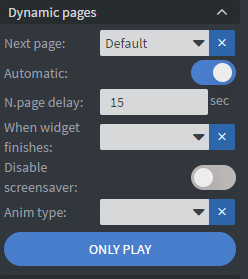
Next Page
- Define which page should play next
- Set whether the page will scroll automatically or change manually
- Specify the duration for how long the page will be displayed
- Disable screensaver to prevent the default page from showing after inactivity
When widget finishes
When widget finishes option allows you to attach actions to widgets based on the played item length inside the widgets.
Disable screen saver
This option disables the screensaver that can be created on Properties / Content / Dynamic pages tab.
Restrictions
Performance mode or Dynamic page
Dynamic pages will not work if Performance mode is enabled!
Learn more: Performance mode