Date Range
What is the Form Date Range?
The Date Range or Date Range picker is used, as the name suggests, as a date-range picking field, which can be styled to your preference. It renders two linked date fields (a start and an end) with a separator between them.

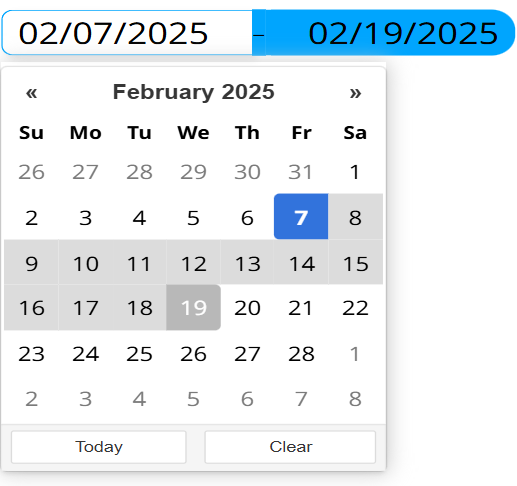
Options
- Position
- Language
- Date format
- Title
- Set today as default
- Highlight today's date
- Show today button
- Show clear button
- Show separator
- Border radius
- Color
Specifies where the date-picking pop-up appears relative to the input fields. The pop-up is always left-aligned to the fields. Values: Bottom (default), Top.
Specifies the language of the calendar (day names, month names, and the Today/Clear button labels). Values: English (default), Hungarian, French, German, Spanish, Russian, Polish, Swedish.
Specifies the format used to display and parse both selected dates. Default: Month/Day/Year (mm/dd/yyyy).
Available formats:
- Year/Month/Day (
yyyy/mm/dd) - Year/Day/Month (
yyyy/dd/mm) - Month/Day/Year (
mm/dd/yyyy) - Day/Month/Year (
dd/mm/yyyy) - Year.Month.Day (
yyyy.mm.dd) - Year.Day.Month (
yyyy.dd.mm) - Month.Day.Year (
mm.dd.yyyy) - Day.Month.Year (
dd.mm.yyyy) - Year-Month-Day (
yyyy-mm-dd) - Year-Day-Month (
yyyy-dd-mm) - Month-Year-Day (
mm-yyyy-dd) - Day-Month-Year (
dd-mm-yyyy)
Specifies the title text shown at the top of the date-picking pop-up. Default: empty (no title).
When enabled, both the start and end fields are preset to today's date on render if no stored value is loaded from the datasource. Default: enabled.
Specifies whether today's date is highlighted in the calendar. Default: enabled.
Specifies whether the Today button appears inside the pop-up. Default: enabled.
Specifies whether the Clear button appears inside the pop-up. Default: enabled.
Specifies whether the separator character is shown between the start and end fields. When disabled, the separator is hidden but the two fields remain. Default: enabled.
Specifies the corner rounding of the input fields, in pixels. Range: 0-60 (step 1). Default: 16.
Specifies the accent color used for the active field border and the calendar highlight. Default: #00a5fe.
Setting Mock Field and Own Value
The Date Range picker exports the mock field only; it does not set a separate own value. The exported value is an object holding the two selected dates:
{ from: <start date>, to: <end date> }
Each date is a string in the configured date format. The export only runs in the displayer; in the editor it is skipped. This happens:
- When the Date Range picker is rendered (the stored value from the datasource, or today's date for both fields when Set today as default is enabled).
- When either field loses focus (blur), for example after a date is selected.
- When an external message tells it to.
Validation
The Date Range picker doesn't validate itself.
Sensor Events
The Date Range picker doesn't validate, so it never emits a {FORM-NAME}-valid sensor event. Whenever the value is exported it triggers a value sensor event named after the field ({FORM-NAME}) carrying the { from, to } object, unless the export was requested silently (by a Reset or Clear command).
External Messages
The Date Range picker listens to all the basic messages.
- Set Form: Takes the message's
valueparameter (which must be a string) and splits it on a semicolon (;) into two parts. The first part is set as the start date and the second as the end date, then the mock is updated. Format:START;END, where each side matches the configured date format (for example01/15/2026;01/20/2026). If the values do not match the format, setting the range can produce an undesired outcome.- Reset Form: Resets both the start and end fields to today's date and updates the mock.
- Clear Form: Clears both fields to empty and updates the mock.
When the framework requests a Reset or Clear silently, no value sensor event is fired.
Value from Datasource
The Date Range picker does not bind an external input datasource to generate its content. When the widget is connected to a form output datasource that already holds a value for this field, that value (a { from, to } object) is loaded as the initial range on render. If no stored value exists and Set today as default is enabled, both fields are preset to today's date instead.